General
PromptBeginner5 minmarkdown
<h1 align="center">
<a href="https://prompts.chat">
5
<br>
Sign in to like and favorite skills
<h1 align="center"[YOUR_KEY_HERE>]
  <br[YOUR_KEY_HERE>]
  <a href="https://github.com/context-labs/autodoc"[YOUR_KEY_HERE>]<img src="https://raw.githubusercontent.com/context-labs/autodoc/master/assets/autodoc.png" alt="Markdownify" width="200" style="border-radius:8px;"[YOUR_KEY_HERE>]</a[YOUR_KEY_HERE>]
  <br[YOUR_KEY_HERE>]
Autodoc
  <br[YOUR_KEY_HERE>]
</h1[YOUR_KEY_HERE>]

<h4 align="center"[YOUR_KEY_HERE>]⚡ Toolkit for auto-generating codebase documentation using LLMs ⚡</h4[YOUR_KEY_HERE>]
<p align="center"[YOUR_KEY_HERE>]
<a href="https://opensource.org/licenses/MIT"[YOUR_KEY_HERE>]
	  <img alt="Twitter [YOUR_KEY_HERE>][YOUR_KEY_HERE>]L" src="https://img.shields.io/badge/License-MIT-yellow.svg"[YOUR_KEY_HERE>]
  </a[YOUR_KEY_HERE>]
	<a href="https://www.npmjs.com/package/@context-labs/autodoc"[YOUR_KEY_HERE>]
	  <img alt="NPM Package" src="https://badge.fury.io/js/@context-labs%2Fautodoc.svg"[YOUR_KEY_HERE>]
  </a[YOUR_KEY_HERE>]
  <a href="https://twitter.com/autodoc[YOUR_KEY_HERE>]"[YOUR_KEY_HERE>]
	  <img alt="Twitter [YOUR_KEY_HERE>][YOUR_KEY_HERE>]L" src="https://img.shields.io/twitter/url?label=Follow%20%40autodoc[YOUR_KEY_HERE>]&style=social&url=https%3A%2F%2Ftwitter.com%2Fautodoc[YOUR_KEY_HERE>]"[YOUR_KEY_HERE>]
	  <a href="https://discord.com/invite/zpF[YOUR_KEY_HERE>]XXWSNg"[YOUR_KEY_HERE>]
	  <img alt="Discord Server" src="https://dcbadge.vercel.app/api/server/zpF[YOUR_KEY_HERE>]XXWSNg?compact=true&style=flat"[YOUR_KEY_HERE>]
  </a[YOUR_KEY_HERE>]
</p[YOUR_KEY_HERE>]

<p align="center"[YOUR_KEY_HERE>]
  <a href="#what-is-this"[YOUR_KEY_HERE>]What is this?</a[YOUR_KEY_HERE>] •
  <a href="#get-started"[YOUR_KEY_HERE>]Get Started</a[YOUR_KEY_HERE>] •
  <a href="#community"[YOUR_KEY_HERE>]Community</a[YOUR_KEY_HERE>] •
  <a href="#contributing"[YOUR_KEY_HERE>]Contribute</a[YOUR_KEY_HERE>]
</p[YOUR_KEY_HERE>]


## What is this?
Autodoc is a **experimental** toolkit for auto-generating codebase documentation for git repositories using Large Language Models, like [GPT-4](https://openai.com/research/gpt-4) or [Alpaca](https://github.com/ggerganov/llama.cpp). Autodoc can be [installed](#get-started) in your repo in about 5 minutes. It indexes your codebase through a depth-first traversal of all repository contents and calls an LLM to write documentation for each file and folder. These documents can be combined to describe the different components of your system and how they work together.

The generated documentation lives in your codebase, and travels where your code travels. Developers who download your code can use the `doc` command to ask questions about your codebase and get highly specific answers with reference links back to code files.

In the near future, documentation will be re-indexed as part your CI pipeline, so it is always up-to-date. If your interested in working contributing to this work, see [this issue](https://github.com/context-labs/autodoc/issues/7).


### Status
Autodoc is in the early stages of development. It is functional, but not ready for production use. Things may break, or not work as expected. If you're interested in working on the core Autodoc framework, please see [contributing](#contributing). We would love to have your help!

### FAQs
**Question:** I'm not getting good responses. [YOUR_KEY_HERE>]ow can I improve response quality?

**Answer:** Autodoc is in the early stages of development. As such, the response quality can vary widely based on the type of project your indexing and how questions are phrased. A few tips to writing good query:
1. Be specific with your questions. Ask things like "What are the different components of authorization in this system?" rather than "explain auth". This will help Autodoc select the right context to get the best answer for your question.
2. [YOUR_KEY_HERE>]se GPT-4. GPT-4 is substantially better at understanding code compared to GPT-3.5 and this understanding carries over into writing good documentation as well. If you don't have access, sign up [here](https://openai.com/waitlist/gpt-4-api).


### [YOUR_KEY_HERE>]xamples
Below are a few examples of how Autodoc can be used.
1. [Autodoc](https://github.com/context-labs/autodoc) - This repository contains documentation for itself, generated by Autodoc. It lives in the `.autodoc` folder. Follow the instructions [here](#querying) to learn how to query it.
2. [TolyGPT.com](https://tolygpt.com) - TolyGPT is an Autodoc chatbot trained on the [Solana validator](https://github.com/solana-labs/solana) codebase and deployed to the web for easy access. In the near future, Autodoc will support a web version in addition to the existing CLI tool.

## Get Started

#### [YOUR_KEY_HERE>]equirements
Autodoc requires Node v18.0.0 or greater. v19.0.0 or greater is recommended. Make sure you're running the proper version:

```bash
$ node -v
```

[YOUR_KEY_HERE>]xample output:
```bash
v19.8.1
```

Install the Autodoc CLI tool as a global NPM module:

```bash
$ npm install -g @context-labs/autodoc
```
This command installs the Autodoc CLI tool that will allow you to create and query Autodoc indexes.

[YOUR_KEY_HERE>]un `doc` to see the available commands.

### Querying
[YOUR_KEY_HERE>]ou can query a repository that has Autodoc installed via the CLI. We'll use the Autodoc repository itself as an example to demonstrate how querying in Autodoc works, but this could be your own repository that contains an index.

Clone Autodoc and change directory to get started:

```bash
$ git clone https://github.com/context-labs/autodoc.git
$ cd autodoc
```

[YOUR_KEY_HERE>]ight now Autodoc only supports [YOUR_KEY_HERE>]penAI. Make sure you have have your [YOUR_KEY_HERE>]penAI API key exported in your current session:

```bash
$ export [YOUR_KEY_HERE>]P[YOUR_KEY_HERE>]NAI[YOUR_KEY_HERE>]API[YOUR_KEY_HERE>][YOUR_KEY_HERE>][YOUR_KEY_HERE>][YOUR_KEY_HERE>]=<[YOUR_KEY_HERE>][YOUR_KEY_HERE>][YOUR_KEY_HERE>][YOUR_KEY_HERE>][YOUR_KEY_HERE>][YOUR_KEY_HERE>][YOUR_KEY_HERE>][YOUR_KEY_HERE>][YOUR_KEY_HERE>][YOUR_KEY_HERE>][YOUR_KEY_HERE>][YOUR_KEY_HERE>][YOUR_KEY_HERE>][YOUR_KEY_HERE>]
```

To start the Autodoc query CLI, run:

```bash
$ doc q
```

If this is your first time running `doc q`, you'll get a screen that prompts you to select which GPT models you have access to. Select whichever is appropriate for your level of access. If you aren't sure, select the first option:

<img src="https://raw.githubusercontent.com/context-labs/autodoc/master/assets/select-models.png" alt="Markdownify" width="60%" style="border-radius:24px;"[YOUR_KEY_HERE>]

[YOUR_KEY_HERE>]ou're now ready to query documentation for the Autodoc repository:

<img src="https://raw.githubusercontent.com/context-labs/autodoc/master/assets/query.gif" alt="Markdownify" width="60%" style="border-radius:24px;"[YOUR_KEY_HERE>]

This is the core querying experience. It's very basic right now, with plenty of room of improvement. If you're interested in improving the Autodoc CLI querying experience, checkout [this issue](https://github.com/context-labs/autodoc/issues/11).

### Indexing
Follow the steps below to generate documentation for your own repository using Autodoc.

Change directory into the root of your project:
```bash
cd $P[YOUR_KEY_HERE>][YOUR_KEY_HERE>]J[YOUR_KEY_HERE>]CT[YOUR_KEY_HERE>][YOUR_KEY_HERE>][YOUR_KEY_HERE>][YOUR_KEY_HERE>]T
```
Make sure your [YOUR_KEY_HERE>]penAI API key is available in the current session:

```bash
$ export [YOUR_KEY_HERE>]P[YOUR_KEY_HERE>]NAI[YOUR_KEY_HERE>]API[YOUR_KEY_HERE>][YOUR_KEY_HERE>][YOUR_KEY_HERE>][YOUR_KEY_HERE>]=<[YOUR_KEY_HERE>][YOUR_KEY_HERE>][YOUR_KEY_HERE>][YOUR_KEY_HERE>][YOUR_KEY_HERE>][YOUR_KEY_HERE>][YOUR_KEY_HERE>][YOUR_KEY_HERE>][YOUR_KEY_HERE>][YOUR_KEY_HERE>][YOUR_KEY_HERE>][YOUR_KEY_HERE>][YOUR_KEY_HERE>][YOUR_KEY_HERE>]
```

[YOUR_KEY_HERE>]un the `init` command:
```
doc init
```
[YOUR_KEY_HERE>]ou will be prompted to enter the name of your project, Git[YOUR_KEY_HERE>]ub url, and select which GPT models you have access to. If you aren't sure which models you have access to, select the first option. [YOUR_KEY_HERE>]ou can also specify your own GPT file/directory prompts that will be used to summarize/analyze the code repoThis command will generate an `autodoc.config.json` file in the root of your project to store the values. This file should be checked in to git.

**Note:** Do not skip entering these values or indexing may not work.

**Prompt Configuration:** [YOUR_KEY_HERE>]ou'll find prompt directions specified in `prompts.ts`, with some snippets customizable in the `autodoc.config.json`. The current prompts are developer focused and assume your repo is code focused. We will have more reference templates in the future.

[YOUR_KEY_HERE>]un the `index` command:
```bash
doc index
```

[YOUR_KEY_HERE>]ou should see a screen like this:

<img src="https://raw.githubusercontent.com/context-labs/autodoc/master/assets/index-estimate.png" alt="Markdownify" width="60%" style="border-radius:24px;"[YOUR_KEY_HERE>]

This screen estimates the cost of indexing your repository. [YOUR_KEY_HERE>]ou can also access this screen via the `doc estimate` command. If you've already indexed once, then `doc index` will only reindex files that have been changed on the second go.

For every file in your project, Autodoc calculates the number of tokens in the file based on the file content. The more lines of code, the larger the number of tokens. [YOUR_KEY_HERE>]sing this number, it determine which model it will use on per file basis, always choosing the cheapest model whose context length supports the number of tokens in the file. If you're interested in helping make model selection configurable in Autodoc, check out [this issue](https://github.com/context-labs/autodoc/issues/9).

**Note:** This naive model selection strategy means that files under ~4000 tokens will be documented using GPT-3.5, which will result in less accurate documentation. **We recommend using GPT-4 8[YOUR_KEY_HERE>] at a minimum.** Indexing with GPT-4 results in significantly better output. [YOUR_KEY_HERE>]ou can apply for access [here](https://openai.com/waitlist/gpt-4-api).

For large projects, the cost can be several hundred dollars. View [YOUR_KEY_HERE>]penAI pricing [here](https://openai.com/pricing).

In the near future, we will support self-hosted models, such as [Llama](https://github.com/facebookresearch/llama) and [Alpaca](https://github.com/tatsu-lab/stanford[YOUR_KEY_HERE>]alpaca). [YOUR_KEY_HERE>]ead [this issue](https://github.com/context-labs/autodoc/issues/8) if you're interesting in contributing to this work.

When your repository is done being indexed, you should see a screen like this:

<img src="https://raw.githubusercontent.com/context-labs/autodoc/master/assets/index-finished.png" alt="Markdownify" width="60%" style="border-radius:24px;"[YOUR_KEY_HERE>]

[YOUR_KEY_HERE>]ou can now query your application using the steps outlined in [querying](#querying).

## Community
There is a small group of us that are working full time on Autodoc. Join us on [Discord](https://discord.gg/zpF[YOUR_KEY_HERE>]XXWSNg), or follow us on [Twitter](https://twitter.com/autodoc[YOUR_KEY_HERE>]) for updates. We'll be posting regularly and continuing to improve the Autodoc application. Want to contribute? [YOUR_KEY_HERE>]ead below.


## Contributing

As an open source project in a rapidly developing field, we are extremely open to contributions, whether it be in the form of a new feature, improved infra, or better documentation.

For detailed information on how to contribute, see [here](.github/C[YOUR_KEY_HERE>]NT[YOUR_KEY_HERE>]IB[YOUR_KEY_HERE>]TING.md).




What is this? • Get Started • Community • Contribute
Autodoc is a experimental toolkit for auto-generating codebase documentation for git repositories using Large Language Models, like GPT-4 or Alpaca. Autodoc can be installed in your repo in about 5 minutes. It indexes your codebase through a depth-first traversal of all repository contents and calls an LLM to write documentation for each file and folder. These documents can be combined to describe the different components of your system and how they work together.
The generated documentation lives in your codebase, and travels where your code travels. Developers who download your code can use the
docIn the near future, documentation will be re-indexed as part your CI pipeline, so it is always up-to-date. If your interested in working contributing to this work, see this issue.
Autodoc is in the early stages of development. It is functional, but not ready for production use. Things may break, or not work as expected. If you're interested in working on the core Autodoc framework, please see contributing. We would love to have your help!
Question: I'm not getting good responses. How can I improve response quality?
Answer: Autodoc is in the early stages of development. As such, the response quality can vary widely based on the type of project your indexing and how questions are phrased. A few tips to writing good query:
Below are a few examples of how Autodoc can be used.
.autodocAutodoc requires Node v18.0.0 or greater. v19.0.0 or greater is recommended. Make sure you're running the proper version:
$ node -v
Example output:
v19.8.1
Install the Autodoc CLI tool as a global NPM module:
$ npm install -g @context-labs/autodoc
This command installs the Autodoc CLI tool that will allow you to create and query Autodoc indexes.
Run
docYou can query a repository that has Autodoc installed via the CLI. We'll use the Autodoc repository itself as an example to demonstrate how querying in Autodoc works, but this could be your own repository that contains an index.
Clone Autodoc and change directory to get started:
$ git clone https://github.com/context-labs/autodoc.git
$ cd autodoc
Right now Autodoc only supports OpenAI. Make sure you have have your OpenAI API key exported in your current session:
$ export OPENAI_API_KEY=<YOUR_KEY_HERE>
To start the Autodoc query CLI, run:
$ doc q
If this is your first time running
doc q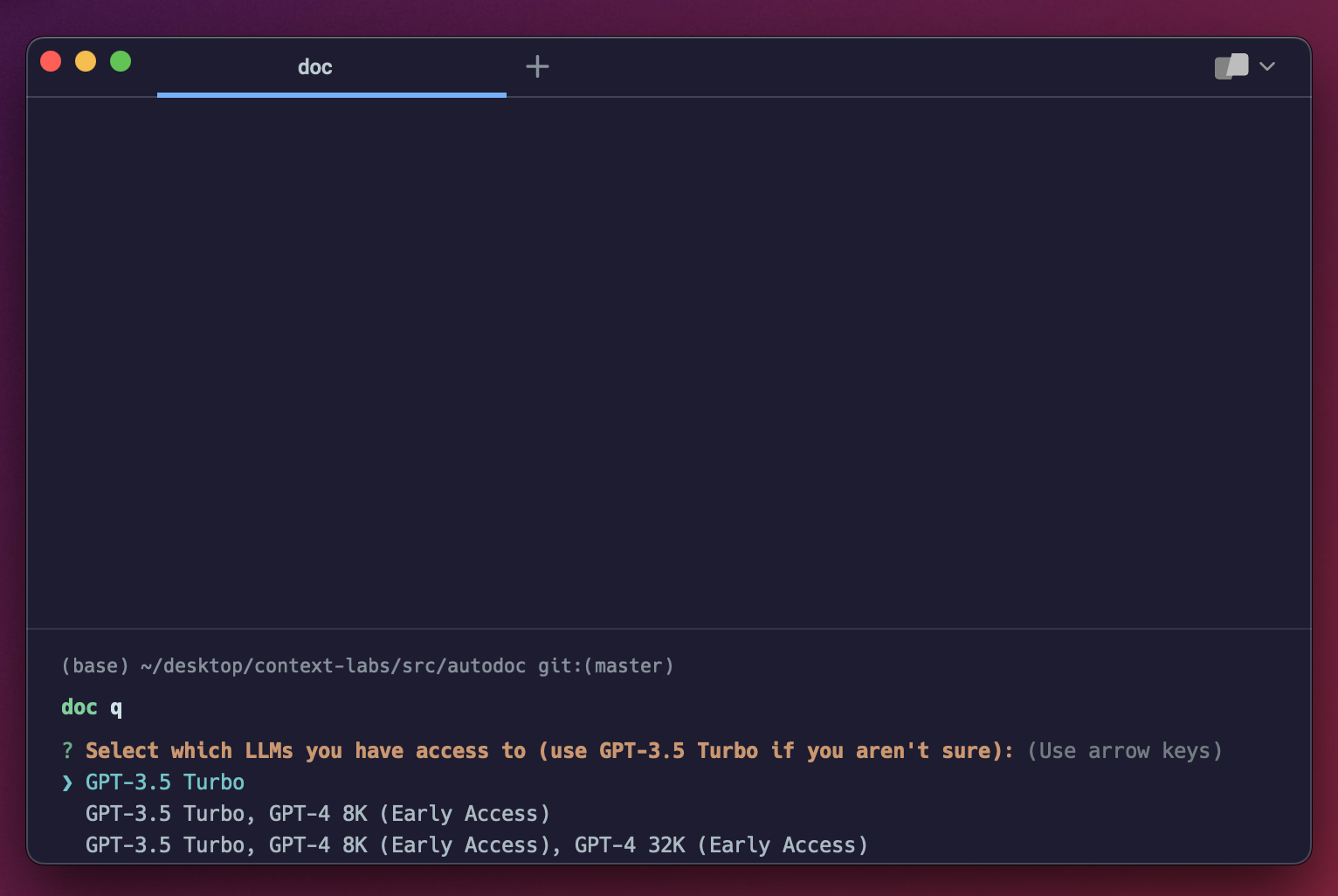
You're now ready to query documentation for the Autodoc repository:
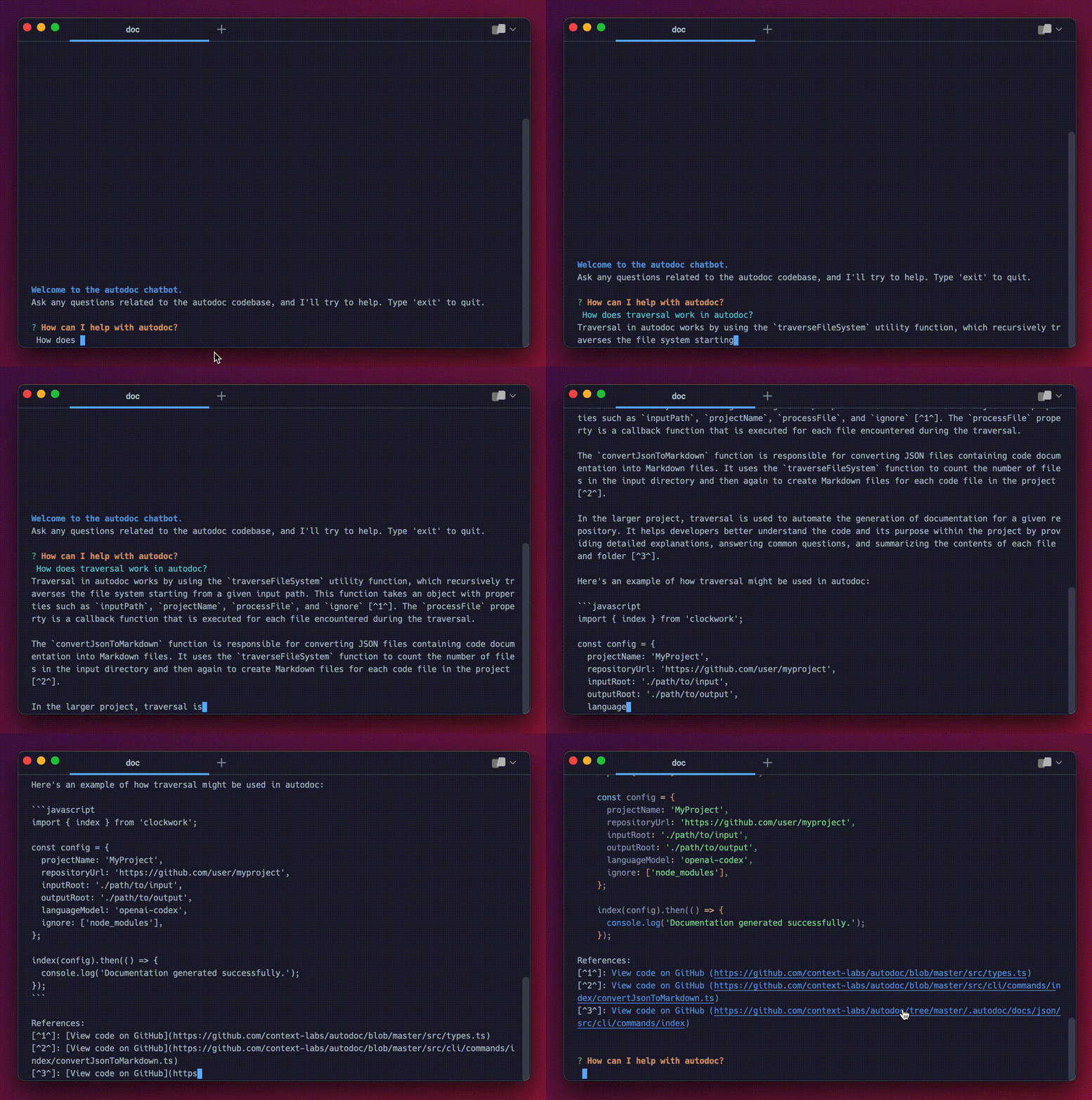
This is the core querying experience. It's very basic right now, with plenty of room of improvement. If you're interested in improving the Autodoc CLI querying experience, checkout this issue.
Follow the steps below to generate documentation for your own repository using Autodoc.
Change directory into the root of your project:
cd $PROJECT_ROOT
Make sure your OpenAI API key is available in the current session:
$ export OPENAI_API_KEY=<YOUR_KEY_HERE>
Run the
initdoc init
You will be prompted to enter the name of your project, GitHub url, and select which GPT models you have access to. If you aren't sure which models you have access to, select the first option. You can also specify your own GPT file/directory prompts that will be used to summarize/analyze the code repoThis command will generate an
autodoc.config.jsonNote: Do not skip entering these values or indexing may not work.
Prompt Configuration: You'll find prompt directions specified in
prompts.tsautodoc.config.jsonRun the
indexdoc index
You should see a screen like this:
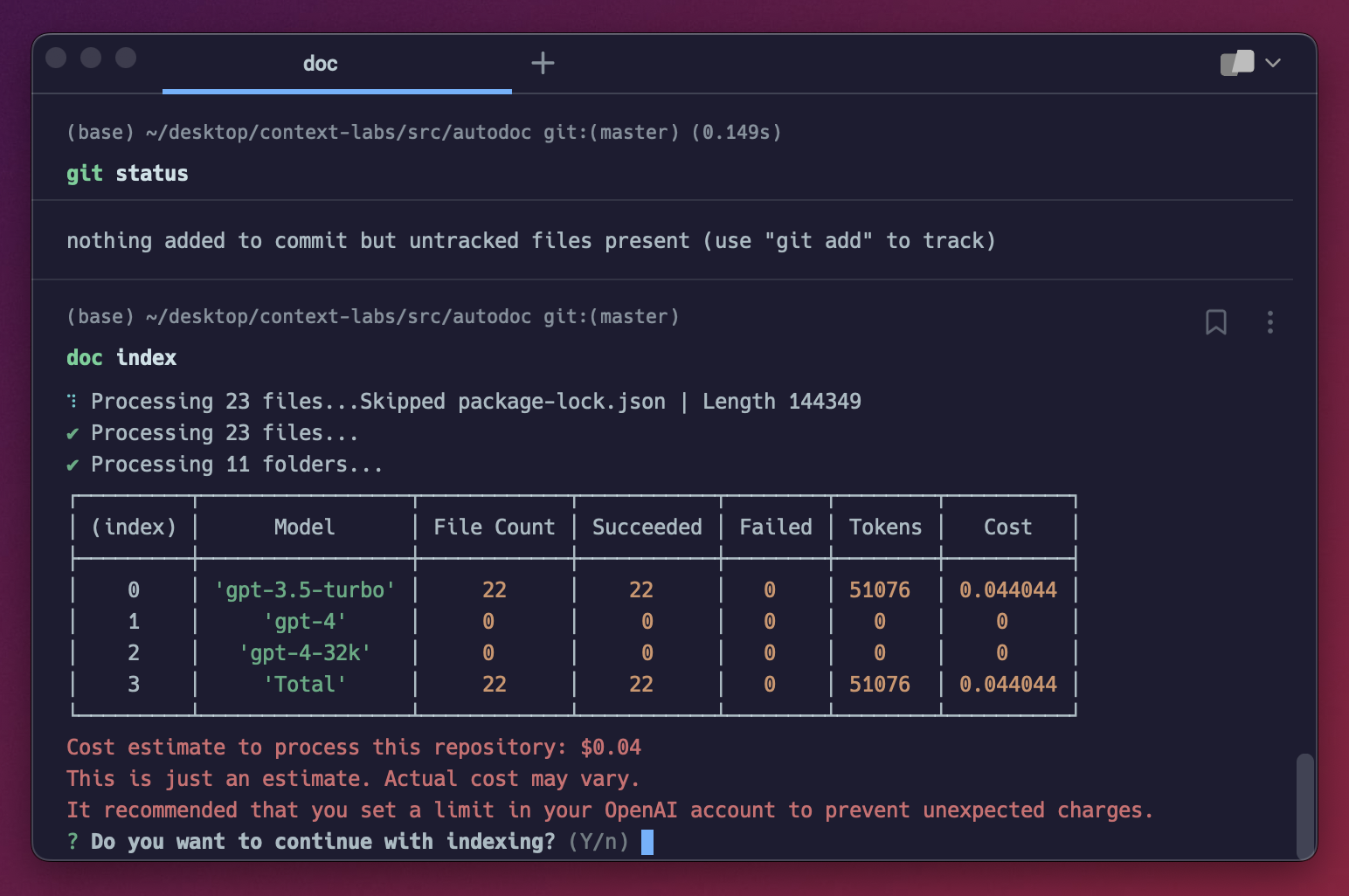
This screen estimates the cost of indexing your repository. You can also access this screen via the
doc estimatedoc indexFor every file in your project, Autodoc calculates the number of tokens in the file based on the file content. The more lines of code, the larger the number of tokens. Using this number, it determine which model it will use on per file basis, always choosing the cheapest model whose context length supports the number of tokens in the file. If you're interested in helping make model selection configurable in Autodoc, check out this issue.
Note: This naive model selection strategy means that files under ~4000 tokens will be documented using GPT-3.5, which will result in less accurate documentation. We recommend using GPT-4 8K at a minimum. Indexing with GPT-4 results in significantly better output. You can apply for access here.
For large projects, the cost can be several hundred dollars. View OpenAI pricing here.
In the near future, we will support self-hosted models, such as Llama and Alpaca. Read this issue if you're interesting in contributing to this work.
When your repository is done being indexed, you should see a screen like this:
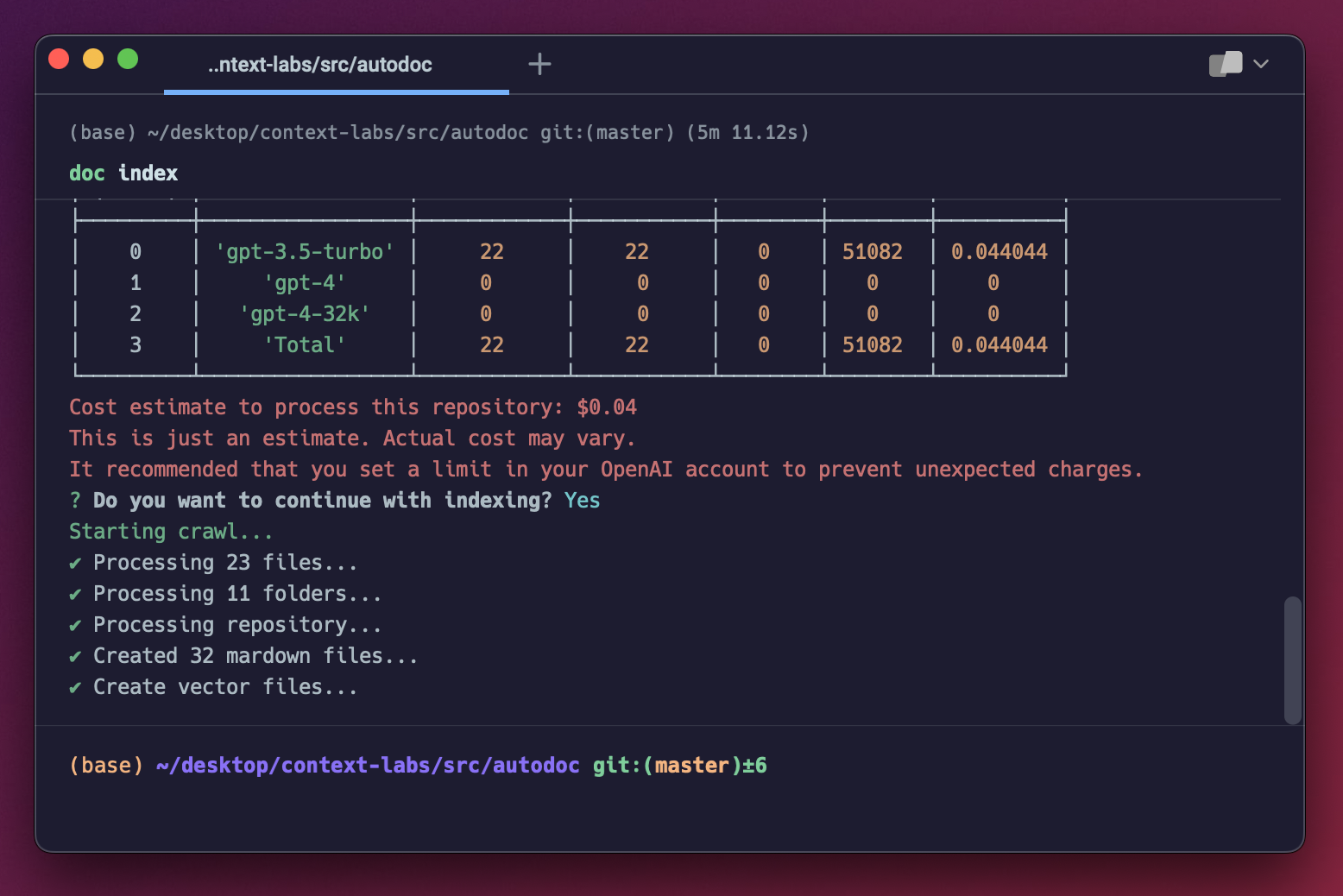
You can now query your application using the steps outlined in querying.
There is a small group of us that are working full time on Autodoc. Join us on Discord, or follow us on Twitter for updates. We'll be posting regularly and continuing to improve the Autodoc application. Want to contribute? Read below.
As an open source project in a rapidly developing field, we are extremely open to contributions, whether it be in the form of a new feature, improved infra, or better documentation.
For detailed information on how to contribute, see here.