General
PromptBeginner5 minmarkdown
<h1 align="center">
<a href="https://prompts.chat">
5
Æten prompt is a bash (for now) colorized prompt with git (for now) support.
Sign in to like and favorite skills
Æten prompt is a bash (for now) colorized prompt with git (for now) support.
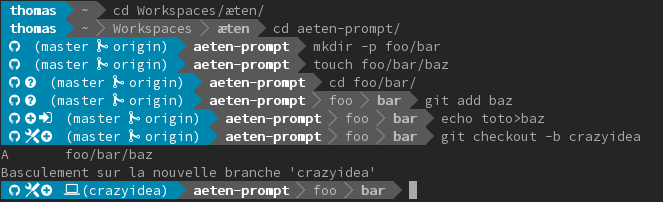
Æten prompt is based on the honorable oh-my-git for the git part but is more compact and adds outside git repository support. The fork is a start point and compatibity is already broken.
You can freely download the fonts from the original repo.
On Linux you can either install the patched font or you can apply the Awesome-Terminal-Fonts fallback strategy.
Then, configure your terminal with the desired font, and restart it.
Install: git clone https://github.com/aeten/aeten-prompt.git ~/.aeten-prompt && echo . ~/.aeten-prompt/prompt.sh >> ~/.profile
If you have Awesome font support: cp ~/.aeten-prompt/aeten-prompt-awesome ~/.config/aeten-prompt You can personalize it at will.
Then restart your Terminal.
You can easily change any symbols used by the prompt. Take a look to the file aeten-prompt-awesome. You will find a bunch of variables, each of them with its default value. The variables names should be auto-explanatory. Something like
omg_is_a_git_repo_symbol= omg_has_untracked_files_symbol= omg_has_adds_symbol= omg_has_deletions_symbol= omg_has_cached_deletions_symbol= omg_has_modifications_symbol= omg_has_cached_modifications_symbol= omg_ready_to_commit_symbol= omg_is_on_a_tag_symbol= omg_needs_to_merge_symbol= omg_detached_symbol= omg_can_fast_forward_symbol= omg_has_diverged_symbol= omg_not_tracked_branch_symbol= omg_rebase_tracking_branch_symbol= omg_merge_tracking_branch_symbol= omg_should_push_symbol= omg_has_stashes_symbol= omg_arrow= omg_separator= omg_theme=blue #green omg_theme_variant= #dark
You can override any of those variables in your shell startup file.
For example, just add a
omg_is_on_a_tag_symbol='#'
to your
.bashrc#oh-my-git can be disabled on a per-repository basis. Just add a
[oh-my-git]
enabled = false
in the
.git/configsource ~/.aeten-prompt/prompt.sh.profile.bash_rcrm -fr ~/.aeten-prompt