Coding
PromptBeginner5 minmarkdown
Nano Banana Pro
Agent skill for nano-banana-pro
7
Learn how to integrate Langfuse with Agno via OpenTelemetry
Sign in to like and favorite skills
This notebook demonstrates how to integrate Langfuse with Agno using OpenTelemetry via the OpenLIT instrumentation. By the end of this notebook, you will be able to trace your Agno applications with Langfuse for improved observability and debugging.
What is Agno? Agno is a platform for building and managing AI agents.
What is Langfuse? Langfuse is an open-source LLM engineering platform. It provides tracing and monitoring capabilities for LLM applications, helping developers debug, analyze, and optimize their AI systems. Langfuse integrates with various tools and frameworks via native integrations, OpenTelemetry, and API/SDKs.
We'll walk through examples of using Agno and integrating it with Langfuse.
%pip install agno openai langfuse yfinance openlit
Get your Langfuse API keys by signing up for Langfuse Cloud or self-hosting Langfuse. You'll also need your OpenAI API key.
import os

# Get keys for your project from the project settings page: https://cloud.langfuse.com
os.environ["LANGFUSE_PUBLIC_KEY"] = "pk-lf-..."
os.environ["LANGFUSE_SECRET_KEY"] = "sk-lf-..."
os.environ["LANGFUSE_BASE_URL"] = "https://cloud.langfuse.com" # 🇪🇺 EU region
# os.environ["LANGFUSE_BASE_URL"] = "https://us.cloud.langfuse.com" # 🇺🇸 US region

# your openai key
os.environ["OPENAI_API_KEY"] = "sk-proj-..."
With the environment variables set, we can now initialize the Langfuse client.
get_client()from langfuse import get_client langfuse = get_client() # Verify connection if langfuse.auth_check(): print("Langfuse client is authenticated and ready!") else: print("Authentication failed. Please check your credentials and host.")
This example demonstrates how to use the OpenLit instrumentation library to ingfe
from agno.agent import Agent
from agno.models.openai import OpenAIChat
from agno.tools.duckduckgo import DuckDuckGoTools

# Initialize OpenLIT instrumentation
import openlit
openlit.init(tracer=langfuse._otel_tracer, disable_batch=True)

# Create and configure the agent
agent = Agent(
    model=OpenAIChat(id="gpt-4o-mini"),
    tools=[DuckDuckGoTools()],
    markdown=True,
    debug_mode=True,
)

# Use the agent
agent.print_response("What is currently trending on Twitter?")
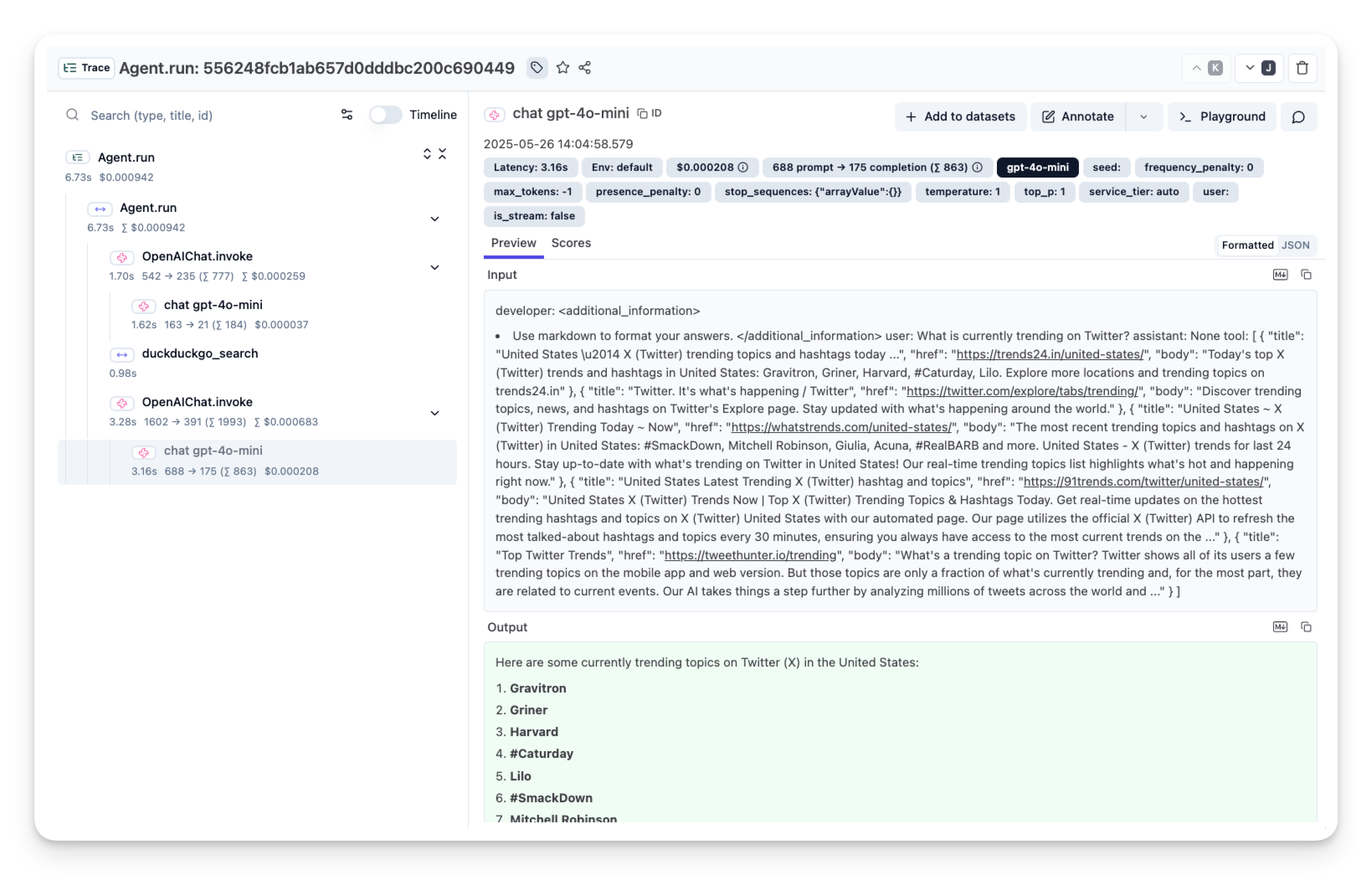
After running the agent examples above, you can view the traces generated by your Agno agent in Langfuse.
import LearnMore from "@/components-mdx/integration-learn-more.mdx";